AI IT Service Desk Automation for Enterprise Teams: Streamlining Ticket Triage, Autonomous Resolution, and ITSM Workflows
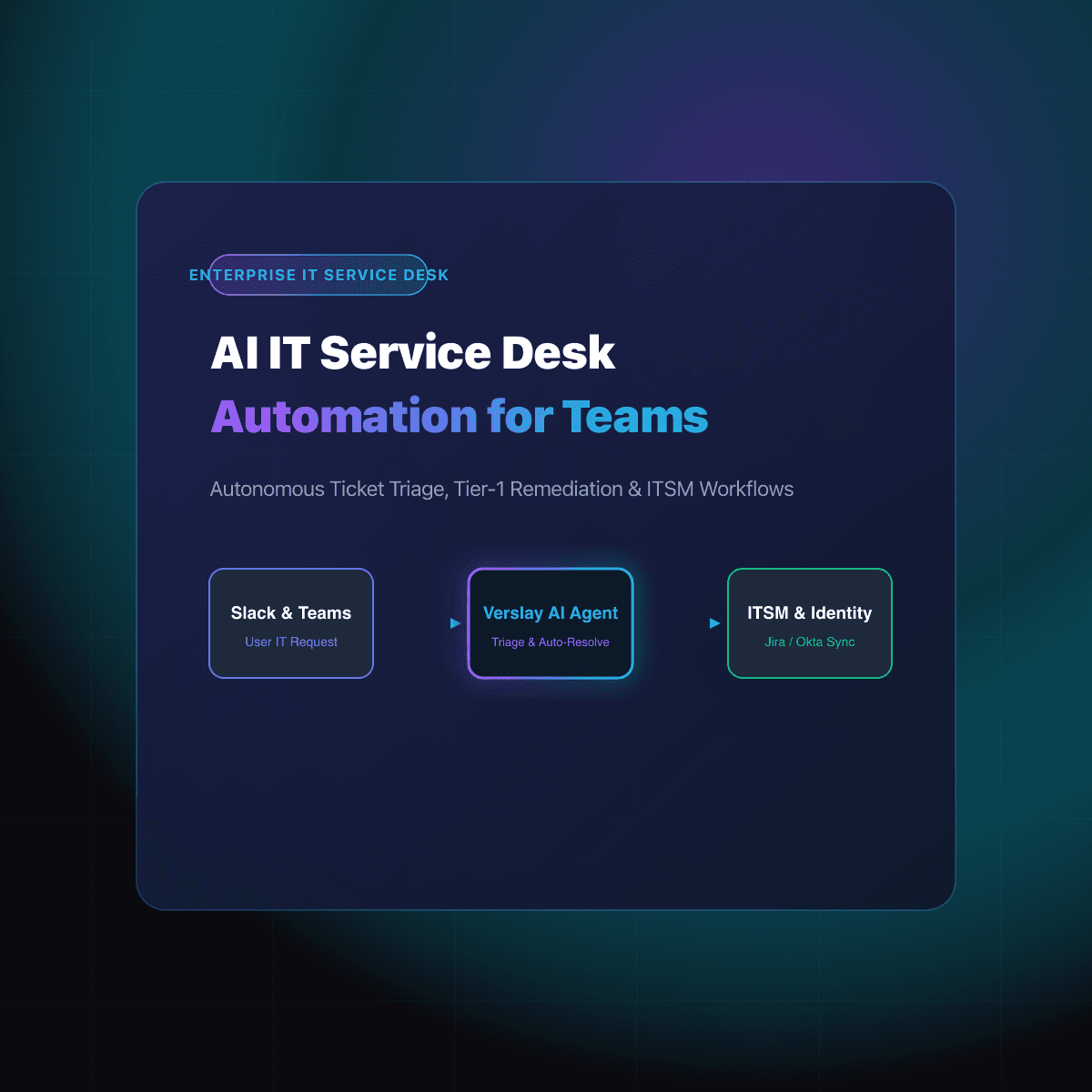
AI IT service desk automation accelerates enterprise IT support by deploying autonomous AI agents to categorize incoming service tickets, resolve routine tier-1 requests, and orchestrate ITSM workflows without human delay. By connecting directly into helpdesk ecosystems such as Jira Service Management, ServiceNow, and Slack via standardized Model Context Protocol (MCP) integrations, autonomous IT agents eliminate ticket backlogs, enforce SLA thresholds 24/7, and route complex incidents to specialist engineers with full diagnostic context.
In modern enterprise environments, IT help desks are overwhelmed by ticket volume. Rapid adoption of SaaS tools, hybrid work models, and distributed endpoint fleets have driven service desk demand to unsustainable levels. According to industry benchmarks, over 50% of incoming service desk tickets represent repetitive, rule-based inquiries—such as password resets, software license provisioning, VPN connection troubleshooting, and hardware upgrade requests. While simple, each ticket consumes technician focus, fragments engineering attention, and forces end users into frustrating queue delays that drag down workforce productivity.
Traditional approaches to ticketing automation—such as keyword-matching deflection bots and rigid interactive voice response (IVR) portals—consistently fail to resolve issues. They frustrate employees with generic knowledge base links and lack the system permissions required to execute actual remediations.
By integrating autonomous AI Agents directly into core IT systems via secure protocol bridges, enterprise organizations transform their service desks from reactive ticket queues into proactive, autonomous resolution engines.
Why Traditional IT Help Desks and Legacy Chatbots Fail
Enterprise support teams have deployed deflection tools for years, yet IT ticket backlogs continue to expand. The failure stems from fundamental architectural limitations in legacy helpdesk software:
+------------------------------------------------------------------------+
|             LEGACY DEFLECTION BOTS vs. AUTONOMOUS AI AGENTS            |
+-------------------------------+----------------------------------------+
| Legacy Chatbots & Keyword FAQs| Autonomous AI Service Desk Agents      |
+-------------------------------+----------------------------------------+
| Rigid keyword pattern matching| Natural language understanding across   |
| that fails on colloquial words| messy, multi-paragraph user reports.  |
+-------------------------------+----------------------------------------+
| Read-only link dumpers; cannot| Tool-empowered operators; can execute  |
| query system state or reset.  | APIs, verify permissions, and patch.   |
+-------------------------------+----------------------------------------+
| Static routing matrices that  | Dynamic sentiment, urgency, and SLA    |
| misclassify complex incidents.| awareness with smart triage routing.   |
+-------------------------------+----------------------------------------+
| Zero cross-system correlation;| Correlates identity, asset inventory,  |
| treats every ticket in a silo.| and recent deployments in real time.   |
+-------------------------------+----------------------------------------+
When an employee messages an IT support channel saying, "My Docker container can't authenticate against our internal staging registry after the SSO migration," legacy deflection bots provide generic Docker install guides or tell the user to open a browser ticket.
In contrast, an ai powered it service desk agent understands the context: it identifies the user's role from Okta, checks whether staging permissions were remapped during the recent identity migration, tests token validity against the registry endpoint, and either provisions the missing group or files an escalated ticket with pre-gathered diagnostic logs.
Architectural Blueprint: How an AI Service Desk Operates
Deploying an ai service desk software architecture replaces multi-step manual ticketing queues with an event-driven agent loop. The agent acts as an autonomous tier-1 technician operating across chat platforms, identity providers, ITSM databases, and asset management registries.
[Employee Request: Slack / Teams / Email / Portal]
                        │
                        ▼
       1. Context Ingestion & Intent Classification
       (Extracts problem domain, urgency, user role)
                        │
                        ▼
       2. Identity & Permission Verification
       (Validates identity in Okta / Azure AD / SCIM)
                        │
                        ▼
        ┌───────────────┴───────────────┐
        ▼                               ▼
  [Tier-1 Resolvable?]          [Complex Escalation?]
        │                               │
        ▼                               ▼
  3a. Autonomous Action         3b. Contextual Triage & Hand-off
  - Execute API remediation     - Generate full diagnostic brief
  - Reset MFA / Session token   - Attach logs, asset & identity state
  - Provision pre-approved app  - Route to specialist on-call queue
        │                               │
        └───────────────┬───────────────┘
                        │
                        ▼
       4. Bi-Directional ITSM Sync & Verification
       (Updates Jira/ServiceNow, logs audit trail, closes loop)
1. Unified Omnichannel Ingestion
Employees interact with IT through Slack, Microsoft Teams, email, or web portals. The AI service desk agent ingests raw messages in real time, normalizing unstructured requests into structured ticket intents without requiring employees to fill out cumbersome multi-field forms.
2. Live Context Gathering and Asset Linking
Before formulating an action plan, the agent inspects the user's enterprise footprint:
- Identity & Role: What department, seniority level, and permission tier does this employee possess?
- Asset Inventory: Which laptop, operating system version, and software packages are assigned to this user via AI IT Asset Management?
- Infrastructure Status: Are there active incidents, deployment rollouts, or service degradations that correlate with the reported symptoms?
3. Autonomous Remediation Execution
For pre-approved, safe operational categories, the agent calls secure internal APIs to complete the request:
- Identity & MFA Resets: Verifies out-of-band identity challenges and triggers temporary passcodes or biometric device re-registration.
- SaaS Access Provisioning: Evaluates role-based access control (RBAC) rules and automatically adds employees to approved Slack channels, GitHub organizations, or Jira projects.
- VPN & Network Profile Diagnostics: Inspects endpoint certificate statuses and distributes updated configuration profiles.
4. Continuous SLA Governance and Escalation
When an issue requires human intervention—such as physical hardware damage or multi-system network outages—the agent constructs an exhaustive technical brief for human technicians. It categorizes ticket priority, assigns tags, and monitors resolution progress against organizational commitments through AI SLA Tracking for Internal IT Teams.
Key Enterprise Workflows Powered by AI Service Desk Agents
Enterprise organizations realize the highest return on investment by deploying ai service desk agents across five high-volume operational categories:
1. Automated Employee Onboarding and Day-One Readiness
Onboarding a new employee requires coordinating hardware assignment, software licensing, email configuration, and team permissions across HR and IT departments. An autonomous service desk agent monitors HR system webhooks, provisions standard application stacks according to departmental role templates, and provides interactive, guided walkthroughs directly in chat on day one.
2. Software License Provisioning and Just-In-Time Access
Instead of forcing engineers or marketers to wait days for a Figma, Tableau, or JetBrains license, employees submit natural language requests in Slack. The agent verifies license availability, cross-references internal budget approval rules, generates temporary or permanent access, and records the transaction for future Automated User Access Reviews.
3. Endpoint Security and Software Patch Compliance
When security scanners flag an out-of-date Zoom client or an unpatched operating system build, the service desk agent opens a gentle, interactive prompt with the end user. It explains the compliance requirement, provides one-click upgrade schedules during off-hours, and monitors device compliance status automatically.
4. Major Incident Triage and War Room Orchestration
During high-severity infrastructure outages, IT help desks are flooded with duplicate incident reports. Autonomous AI agents deduplicate incoming tickets, aggregate impact telemetry, group related alerts under a single parent incident, and draft real-time stakeholder status updates while engineers focus on remediation.
Enterprise Governance, Security, and Auditability
Deploying AI inside core enterprise IT infrastructure requires rigorous safety controls. Autonomous agents must never operate as unmonitored black boxes with unrestricted administrative credentials:
- Role-Based Least Privilege: Agents operate with scoped, read-only permissions for diagnostic checks and strictly bounded API keys for state-modifying actions.
- Immutable Audit Trails: Every interaction, parameter extraction, and API invocation is logged into an immutable audit trail, ensuring complete compliance with SOC 2 Type II and ISO 27001 frameworks.
- Deterministic Guardrails: For sensitive operations—such as elevated privilege escalation or permanent data deletion—the agent requires explicit human-in-the-loop managerial approval before execution.
Measuring Success: The Concrete ROI of Service Desk Automation
Organizations adopting ai it help desk automation track transformative improvements across core service metrics:
| Metric | Traditional Enterprise Baseline | AI-Automated Service Desk | Impact | | :--- | :--- | :--- | :--- | | First-Contact Resolution (FCR) | 40% – 50% | 75% – 85% | +35% improvement | | Mean Time to Resolution (MTTR) | 4.2 hours | 45 seconds (tier-1) | 99% reduction | | Tier-1 Ticket Deflection | 10% – 15% (static FAQs) | 55% – 65% (autonomous actions) | 4x deflection | | Technician Time on Repetitive Admin | 22 hours / week | 3 hours / week | 85% time saved | | Employee CSAT | 72% | 94% | +22 points |
By eliminating repetitive ticket fatigue, IT organizations retain top technical talent, maintain predictable operational budgets, and deliver consumer-grade support experiences to their entire workforce.
Frequently Asked Questions
How to use ai in service desk?
Enterprise IT teams use AI in the service desk by connecting autonomous agents to ITSM platforms like Jira Service Management and ServiceNow, automatically resolving password resets, provisioning SaaS access, diagnosing endpoint issues, and routing complex incidents to specialist engineers.
How can ai help service desk?
AI helps service desks eliminate repetitive tier-1 queues, reduce mean time to resolution (MTTR) from hours to seconds, enforce SLA compliance 24/7, and deflect up to 60% of routine employee support inquiries through conversational self-service.
What impact does automation have on a service desk?
Service desk automation reduces support operational overhead, prevents technician burnout, guarantees consistent security policy enforcement across access requests, and frees IT staff to focus on strategic infrastructure and security initiatives.